


Capsule | Mini Projector for Home Entertainment
Level Up Your Home Entertainment With This Mini Portable Projector
- Remarkable Clarity and Contrast: DLP's advanced IntelliBright algorithms deliver a remarkably bright 100 ANSI Lumens image. (Recommended for use in dimmer environments.)
- 360° Speaker: Equipped with a powerful omnidirectional speaker, this mini projector pumps out sound all around.
- Home Entertainment: Enjoy your favorite movies, TV shows, and more up to 100 inches anywhere in your home thanks to Capsule’s soda can-sized design.
- Android 7.1: Run streaming and media apps flawlessly. Seamlessly display content from Netflix, Youtube, and more on your mini projector for endless entertainment.
- NOTE: Copyrighted content from Hulu, Netflix, and similar services CAN NOT be mirrored or screencast. Download and use the apps directly through Capsule portable projector to view copyrighted content from these providers. Chromecast is not supported. For peak performance, please update to the latest firmware.
color:
€32.95
- Remarkable Clarity and Contrast: DLP's advanced IntelliBright algorithms deliver a remarkably bright 100 ANSI Lumens image. (Recommended for use in dimmer environments.)
- 360° Speaker: Equipped with a powerful omnidirectional speaker, this mini projector pumps out sound all around.
- Home Entertainment: Enjoy your favorite movies, TV shows, and more up to 100 inches anywhere in your home thanks to Capsule’s soda can-sized design.
- Android 7.1: Run streaming and media apps flawlessly. Seamlessly display content from Netflix, Youtube, and more on your mini projector for endless entertainment.
- NOTE: Copyrighted content from Hulu, Netflix, and similar services CAN NOT be mirrored or screencast. Download and use the apps directly through Capsule portable projector to view copyrighted content from these providers. Chromecast is not supported. For peak performance, please update to the latest firmware.
Order Support
Delivery & Payment

Capsule | Mini Projector for Home Entertainment
€32.95

Soda-Can Design
Enjoy movie night in the backyard, at the campsite, or even on the beach. Just slip it into your pack for truly unbridled entertainment.

Enlarge Your
Entertainment
Capsule's 100 ANSI lumen bulb is capable of projecting a picture of gigantic proportions—100 inches to be exact.

360° Sound
Whether it's an explosive action scene or a whispered exchange between long-lost lovers, Capsule ensures you’ll never miss a moment.

Android 7.1
Immerse yourself in content from your favorite apps, including Netflix, YouTube, and more.

Feature-Length Playtime
Be it a certain mafioso sequel you can’t stop watching or a space epic set in a galaxy far, far away, you’ll always see the credits roll.
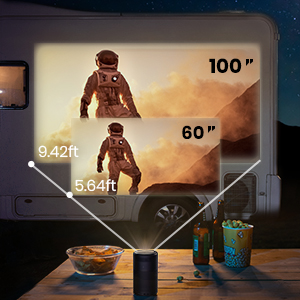
Supersize Your Entertainment
Take the epic scale of the cinema with you wherever you go. Simply pop down this mini-projector and enjoy your favorite shows, movies, and games up to 100 inches big.

It’s All About Connections
Play content from your favorite HDMI and USB devices via the 2 rear ports—you can even forgo wires entirely and stream content to Capsule via Airplay, Miracast, or Bluetooth.

Control From the App
The show must go on, even if you can’t find the remote. Control this mini-projector from your phone with the “Nebula Connect” app. Download it now from Google Play or the App Store.

Feel At Home On the Road

Unleash Their Creativity

Pitch Your Cinema Anywhere
Product/Features
 |  |  |  |  |  | |
Capsule | Capsule 3 Laser | Capsule II | Cosmos Laser 4K | Cosmos Max | Mars II Pro | |
| Price | $299.99 | $799.99 | $579.99 | $2,199.99 | $1,699.99 | $549.99 |
| Projection Technology | DLP | DLP, Laser Light Engine | DLP | DLP, Laser Light Engine | DLP | DLP |
| Brightness | 100 ANSI Lumens | 300 ANSI Lumens | 200 ANSI Lumens | 1840 ANSI Lumens | 1500 ANSI Lumens | 500 ANSI Lumens |
| Resolution | 854×480 (16:9) | 1920×1080 (16:9, FHD) | 1280×720 (16:9, HD) | 3840x2160 (16:9, UHD) | 3840x2160 (16:9, UHD) | 1280x720 (16:9, HD) |
| Projection Size | 40-100 in: 100 in @2.87m; 80 in @2.29m; 60 in @1.72m; 40 in @1.14m | 40-120 in: 120 in @3.18m; 100 in @2.65m; 80 in @2.13m; 60 in @1.59m; 40 in @1.05m | 40-100 in: 100 in @2.87m; 80 in @2.29m; 60 in @1.72m; 40 in @1.14m | 60-150 in: 150 in @4.22m; 120 in @3.37m; 100 in @2.81m; 80 in @2.25m; 60 in @1.68m | 60-150 in: 150 in @3.98m; 120 in @3.18m; 100 in @2.65m; 80 in @2.13m; 60 in @1.59m | 40-100 in: 100 in @2.65m; 80 in @2.13m; 60 in @1.59m; 40 in @1.05m |
| Operating System | Android 7.1, Download apps in Nebula Manager store | Android TV 11.0, Download 7000+apps in Google Play store | Android TV 9.0, Download 7000+apps in Google Play store | Android TV 10.0, Download 7000+apps in Google Play store | Android TV 9.0, Download 7000+apps in Google Play store | Android 7.1, Download apps in Nebula Manager store |
| Speaker | 1× 5W (360°) | 8W & Dolby Digital Plus | 1× 8W (270°) | 2x 10W and 2x 5W, Dolby Audio, AiFi technology | Dolby Digital Plus& 4x10W | 2× 10W |
| Video Playtime | Up to 4 hours in battery mode, up to 2.5 hours in standard mode | Up to 2.5 hours | Up to 2.5 hours in battery mode, up to 2 hours in standard mode | DC IN, no battery | DC IN, no battery | Up to 3 hours in battery mode, up to 1.5 hours in standard mode |
| Connectivity | HDMI, USB, Bluetooth, Wi-Fi, and Screen Mirroring | HDMI, USB, Bluetooth, Wi-Fi, and Chromecast | HDMI, USB, Bluetooth, Wi-Fi, and Chromecast | HDMI, USB, Bluetooth, Wi-Fi, and Chromecast | HDMI, USB, Bluetooth, Wi-Fi, and Chromecast | HDMI, USB, Bluetooth, Wi-Fi, and Screen Mirroring |
| Focus | Manual | Automatic (3 second) | Automatic (1 second) | Seamless Autofocus | Automatic | Automatic |
| Keystone Correction | Auto Vertical+Manual Horizontal | Auto (vertical ±40° & horizontal ±40°) | Auto Vertical | Gridless Auto Keystone Correction (Horizontal & Vertical) | Auto Vertical+Manual Horizontal | Auto Vertical+Manual Horizontal |
| Size | 2.7 x 2.7 x 4.7 in / 68 x 68 x 120 mm | 3.3 x 3.3 x 6.7 in / 83 x 83 x 170 mm | 3.1 x 3.1 x 5.9 in / 80 x 80 x 150 mm | 10.4 x 6.5 x 8.7 in / 263 x 165 x 220 mm | 13.8 x 9.8 x 3.9 in / 350 x 250 x 100 mm | 7.0 x 4.8 x 5.2 in / 178 x 122 x 133 mm |
| Weight | 1.0 lb | 2.1 lb | 1.6 lb | 10.7 lb | 6.6 lb | 3.9 lb |
FAQ
How do I use the keystone correction?
How to do adjust Capsule's focus?
How to do zoom the image in and out?
Adjusting the Brightness
How do I adjust the color display?
What's Capsule's maximum projection range?
How do I mirror my screen on Capsule?
1. Make sure your phone and Capsule are connected to the same Wi-Fi network
2. Enable the Screen Mirroring on your iOS device in the control center
3. Once Capsule shows up on your phone's Screen Mirroring List, select it to connect
Android Devices:
a. Switch on Capsule and go to Settings>General>Screen Mirroring>Android
b. Enable the Screen Mirroring on your phone via the pull-down menu, Settings, or WLAN settings
c. Select "Nebula-xxxxxx" to connect
Please note that copyrighted content won't be able to be mirrored or cast.
How do I play videos when no Wi-Fi is available?
- Install the File Explorer app from Google Play Store on Capsule
- Install a media player app such as VLC or Kodi
- Plug the USB drive into Capsule to play
Can I pair my remote with Capsule?
How do I switch to Bluetooth speaker mode?
How do I control Netflix on my Capsule?
How to download the Nebula Connect app?
How do I use the Nebula Connect app?
2. Open the Nebula Connect app on your phone and click the "+" on the top right to connect with Capsule
3. Once connected, you can select either mouse mode or controller mode to operate.


